
Harnessing Power BI in Excalibur WMS for Greater Control and Efficiency
In today’s 3PL warehousing, real-time intelligence is the new competitive edge. By integrating Microsoft Power BI with Excalibur, warehouse operators gain more visibility into their operations, enabling faster, data-driven decisions and even more efficiency gains.
We have pre-built four Power BI reports for Excalibur that you can use today! Note: You must be using Excalibur version 27.0+ (Update 19.05+) and have Camelot KPI Module. These interactive dashboards, accessible directly within Excalibur for users with a Power BI license, consolidate critical metrics across your organization into one place, serving as a “single source of truth” for warehouse health.
Power BI + Excalibur: Better Control of Your 3PL
Integrating Power BI with Excalibur means all your key operational and financial metrics are available at a glance on interactive dashboards. Instead of juggling spreadsheets or separate reports, managers see live updates on inventory, receipts, shipments, and billing in one place. This level of visibility and control allows you to quickly identify trends and bottlenecks that impact efficiency:
- Proactive decision-making: Real-time data eliminates guesswork. Managers can react immediately when a KPI deviates from target. No more waiting for end-of-week reports; decisions can be made on the fly to keep operations smooth.
- Full operational oversight: Excalibur already captures data across receiving, inventory, picking, shipping, and billing. Power BI funnels this rich data into one view, so you maintain full control of the operation.
- Enterprise-wide and client transparency: Camelot’s Power BI reports can be shared across your entire warehouse organization. Anyone with a Power BI license and Camelot KPI Module (and proper permissions) can view these dashboards embedded inside the Excalibur interface for a seamless in-system experience.
Availability: These Power BI report dashboards are available to any warehouse running Excalibur version 27.0 (Update 19.05) or later. They are included with the KPI Analysis module and are accessible from within Excalibur once enabled (a Power BI Pro license is required for each user to view the embedded reports). Now, let’s look at the four Camelot Power BI reports we pre-built:
Four Essential Excalibur Power BI Reports and Their Benefits
The four out-of-the-box Power BI reports are: Inventory, Finance, Receipts, and Shipments. Each report provides targeted insights and KPIs for that functional area, helping you optimize both daily tasks and high-level strategy.
| Report Name | Key Features (What it Shows) | Business Benefits (How it Helps) |
Excalibur Inventory 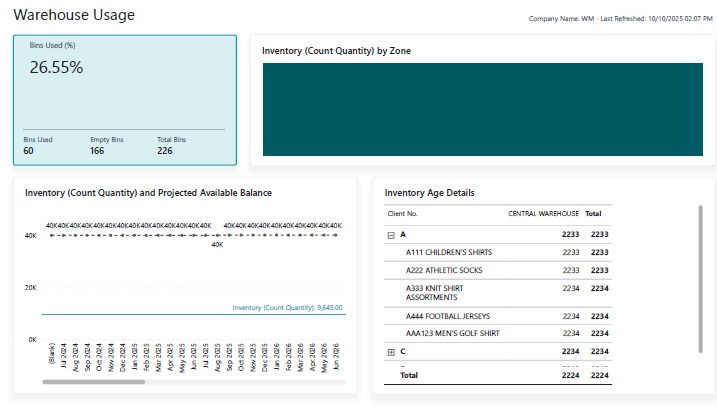 Click to view example report | Real-time on-hand inventory across all warehouses, clients, and SKUs. Displays total inventory levels, committed vs. incoming stock, bin utilization rates, and inventory aging (how long items have been in storage). Users can drill from high-level summaries down to specific bins or items. | – Visibility of Stock: Know exactly what inventory is available or allocated, preventing surprises and stockouts. – Capacity & Space Optimization: Identify underutilized bins or overstock situations at a glance, enabling better slotting and space use. – Aging Alerts: Spot aging inventory to avoid obsolescence or to initiate first-in-first-out moves, improving turnover. This report supports smarter inventory planning and proactive warehouse management by highlighting risk areas (e.g. overstock or expiry) early. |
Excalibur Finance 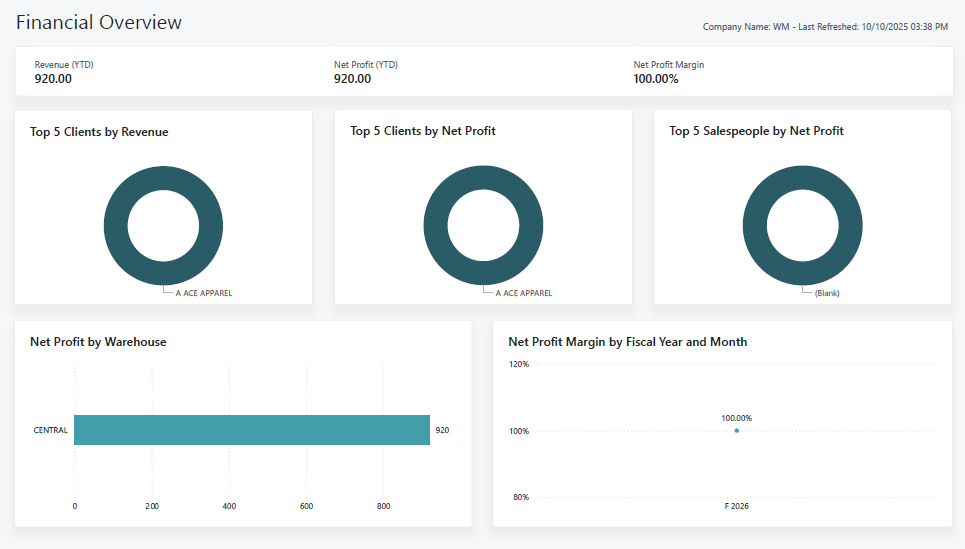 Click to view example report | Financial performance dashboard for warehouse operations. Shows revenue, net profit, and profit margins broken down by client, warehouse, and service type. Clearly separates revenue streams like handling vs. storage. Includes year-to-date totals and comparisons. | – Profitability Insight: Understand which clients, sites, or services contribute most to the bottom line (and which might be underperforming) – Billing Transparency: Break down revenue by service (e.g., storage fees vs handling fees) to ensure charges match activity and to justify pricing to clients. – Informed Decision-Making: Identify high-margin vs low-margin business segments which supports decisions on contract negotiations, resource allocation, and strategic investments. Overall, this report enables more informed and data-backed financial decisions for the 3PL operation. |
Excalibur Receipts 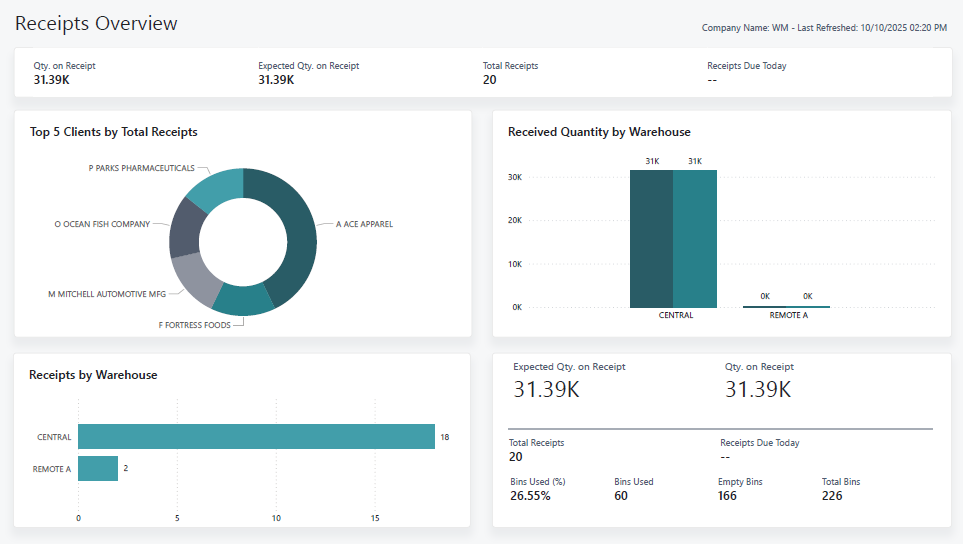 Click to view example report Click to view example report | Inbound operations tracker. Lists all expected receipts and their status: what’s due today or upcoming, what’s been received so far, and what’s put away. Summarizes received quantities by warehouse and client, and highlights dock capacity usage | – Improved Receiving Efficiency: By showing all inbound shipments and deadlines, the warehouse can plan labor and dock space ahead of time – Bottleneck Reduction: If receipts are piling up, managers see it in advance and can allocate extra staff or shifts to unload and put away faster. – On-Time Inbound: The report’s visibility into due receipts helps ensure nothing inbound is overlooked or delayed, which keeps upstream supply chain partners satisfied. |
Excalibur Shipments 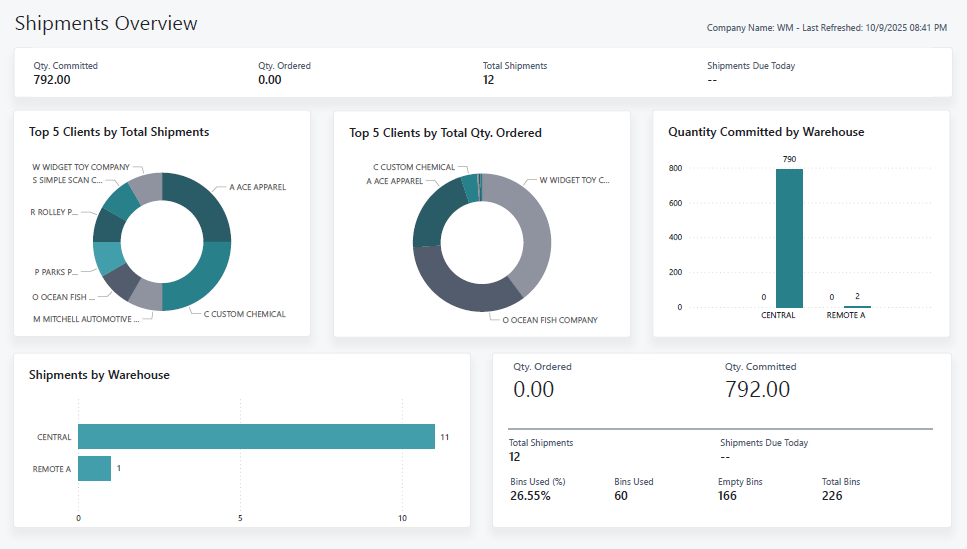 Click to view example report | Outbound fulfillment dashboard. Provides end-to-end visibility on all outgoing orders/shipments. Tracks open orders and their committed inventory, shipments due today, and overall shipping volume by warehouse or client. Indicates which orders are ready to ship versus those awaiting stock or other tasks. Also shows shipment line details and workflow status | – Better Fulfillment Planning: Knowing what’s scheduled to ship (and from where) allows supervisors to allocate picking/packing resources optimally each day, improving throughput. – On-Time Delivery: By highlighting shipments due today or urgent orders, the team can prioritize critical fulfillments thereby boosting on-time shipment rates and customer satisfaction. – Bottleneck Prevention: Trends in outbound volume by client or warehouse help identify potential bottlenecks. |
Integrating Microsoft Power BI with your Excalibur gives you unparalleled control over your 3PL warehouse operations. You gain end-to-end visibility, from inventory in the racks to dollars on the balance sheet, and from inbound deliveries to outbound shipments. This holistic insight means you can make smarter decisions faster – and that leads to tangible improvements: higher accuracy, greater efficiency, and improved customer satisfaction. Camelot’s out-of-the-box Excalibur Power BI reports are a powerful starting point to transform raw data into clear, actionable knowledge. Embracing these tools will not only improve day-to-day operational performance but also help you drive growth and profitability in the long run, keeping your business a step ahead in the competitive logistics market.
Ready to gain more control and efficiency with your WMS data?
Camelot’s Power BI reports for Excalibur can be shared across the entire warehouse organization, giving teams easy access to the insights they need. The reports can be shared and opened by anyone in your organization with a Power BI license. Excalibur users with a Power BI license and the Camelot KPI Module can also view these reports directly within Excalibur for a seamless, in‑system experience Note: Must be using Excalibur version 27.0+ (Update 19.05+).
FAQs
- Do I need a Power BI Pro license to publish reports?
No. A Pro license isn’t needed to publish reports. The standard (free) Power BI license is enough. Learn more in Power BI Licensing. - If someone shares a report with another person, then that person needs a Pro license to see the report. Are there plans to make this capability possible with the free license?
We don’t have control over this requirement. Power BI sets this requirement. Learn more at Share Power BI dashboards and reports with coworkers and others. - How are the reports refreshed?
The reports can be scheduled for automatic refresh at desired days and times of the week. Manual refreshes can be done at any time. - Can the reports get data from pages exposed as web services (OData)?
Web services are an old technology and aren’t recommended to use with Power BI. We recommend using Camelot’s Analytics API. Learn more at Excalibur Analytics API. - Can I customize the reports to my organization’s liking?
Yes. All of the reports can be customized—you can add new pages and visuals or remove existing pages and visuals.